Showing posts with label techy. Show all posts

Tuesday, May 19, 2009

enthusiastic about enfuse
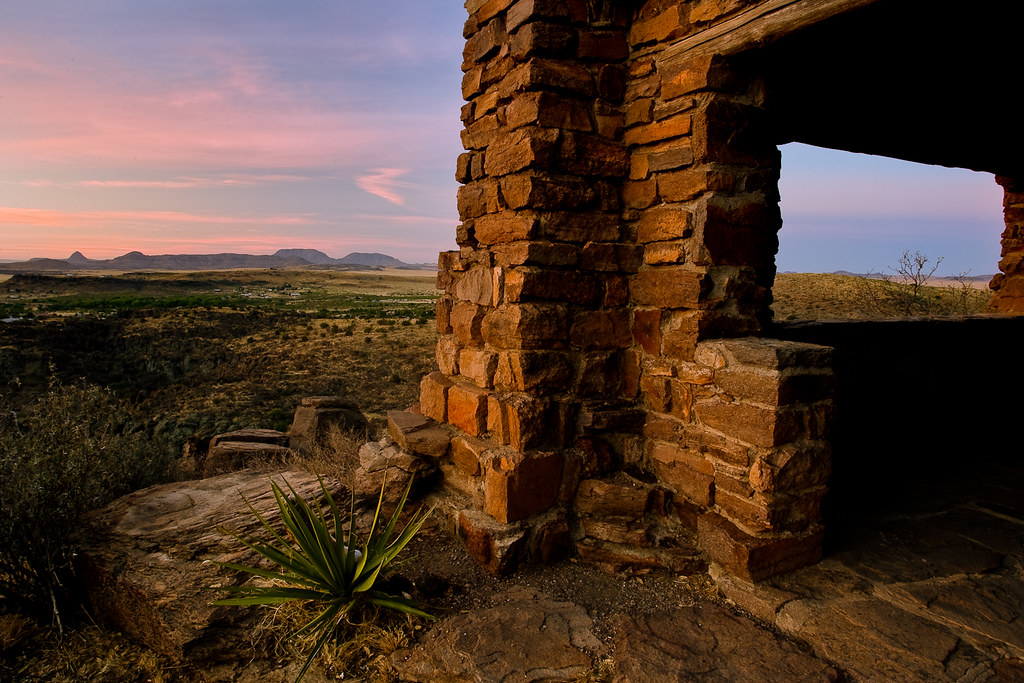
dawn

I've dabbled with HDR photography a bit in the past, but always felt the results were quite cartoonish. The saturation is often off the charts and the local contrast added by most tone mapping algorithms typically seems very heavy handed, for what I want to achieve. While that is a perfectly valid thing to do, it just doesn't appeal to me that much. I have managed to do some more realistic HDR images, using the Wukong beta/ Essential HDR product from Imaging Luminary but since I moved to a Mac, I haven't been able to use their software. I started looking for something similar for OS X and got a recommendation for Enfuse. This is an open-source solution to the problem, that takes quite a different approach to blending the exposures.

Instead of generating a merged, high dynamic range image with floating point pixel values, the enfuse algorithm picks out from across the various exposures what it considers to be the best exposed pixels for a particular region, then merges them all together. There is some level of control for the user; to provide masks, or bias it towards keeping contrast or saturation in the image. The algorithm can also automatically align images, if you haven't shot them all on a tripod. I've found that the defaults work well to merge a well exposed set of images. The resulting merged image is then a great starting point for further adjustments.

While Enfuse is open source and available for free, I've been using an Adobe Lightroom plugin that is sold as donationware, by Timothy Armes. The LR/Enfuse plugin simplifies running the merge from Lightroom. I just have to select the various exposures and run the plugin to get a merged result back in Lightroom, ready for further adjustment.
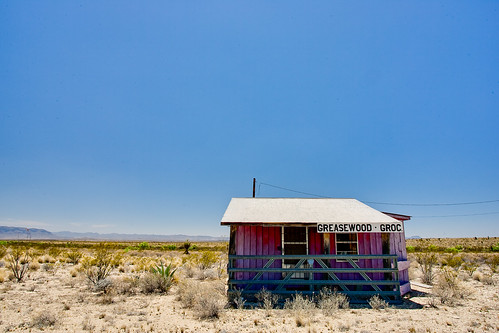

greasewood

greasewood enfuse

Many years ago I learned to shoot pretty wide brackets around a given exposure when I'm working on a tripod. With digital, the brackets are essentially free and this ensures you have all the data you might need to merge exposures back at home. Particularly when working with fleeting light or in hard to get to locations, I'd rather shoot a few more frames at the time, than wish I had them when I got home. I'll typically pick a working f-stop, based on the depth of field I want in the scene, then shoot at one stop intervals around the metered exposure, from -2EV, -1EV, 0, +1EV and +2EV. I normally do this in Aperture Priority mode, so that only the shutter speed is changing, but the depth of field is constant. In some cases, if there are particularly extreme lighting situations, I might shoot another stop above or below those as well, but I've found that five stop increment is often more than I need, particularly shooting around twilight. These 5 exposures give me a great starting point to blend for a final image. In the past I might have processed them as multiple exposures and then layered them in Photoshop, using masks to pick out particular parts of the image. Now they are a great starting point for Enfuse. In the example above, the porch of the building was in really heavy shadow, in the noon day sun, so I've shot 6 exposures, to get some detail and deep colour in the shadow areas (in the lightest exposure, to the far right), while still trying to keep some detail in the white, reflective roof (in the leftmost exposure).

To run the merge, I pick the darkest exposure that still had the right levels for the lightest parts of the image and the same at the other end, selecting the lightest exposure that had the shadow values that I wanted. I then use those as the outliers and pick all the in-between exposures and run the Enfuse plugin. I haven't tried varying the default values yet, as it has given consistently good results from the images I took in Big Bend. Enfuse is a great option if you are interested in working with scenes with a large range of tonalities or extremes of lighting, but want to try to produce more natural results. The price is right too. There are other GUIs available for Enfuse, if you don't like using Lightroom. I haven't had any experience with these, but options such as EnfuseGUI do exist if you wanted to avoid Lightroom and also the command line.
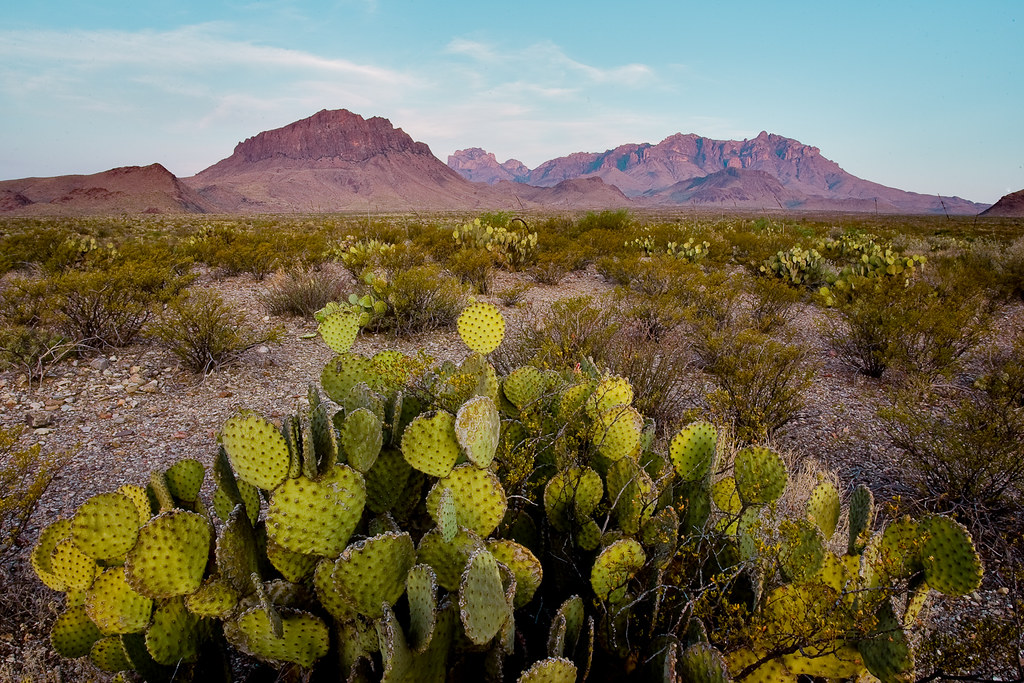
chisos

Sunday, April 12, 2009

fire at will

Spent about 30 minutes today trying to figure out how to trigger my 3 small strobes. I've got a bit of a mix of lights and triggers - 3 pocket wizards, two canon speedlites (a 580EX and a 420EX slave only/ TTL unit) and a cheap, second-hand Nikon SB28. I've also got a set of radio poppers (thanks to the guys at Tricoast) and a Canon ST-ET2 transmitter. A bit of a mess really. The problem is, I can't easily trigger all 3 lights at the same time. I can easily trigger pairs of them, using the pocket wizards, to control the 580EX and one of the SB28 or the 420EX. I can use the ST-ET2 to trigger both the 580EX and the 420EX, with or without the radio poppers in the mix to remove the need for line of sight. But I couldn't get all three to trigger at the same time. Eventually today I worked it out - but it is still a bit of a mess.

I was able to use the pocket wizards to trigger the 580EX, in master mode, that then triggers the 420EX. That works fine. Then if I add in the SB28, also triggered by the pocket wizard, all three only trigger, if the SB28 is out of sight of the other units. The 580EX seems to communicate/ trigger the 420EX within the white light flash output - I thought it might have been IR, but it doesn't seem to be. So the SB28 firing at the same time confused the 420EX in to not firing. The solution was to use the radio poppers to trigger the 420EX, covering up its control window with some duct tape, so that it only sees the control pulse from the radio popper. Not really ideal, but it seems to work at least for now. Next step is working out how to control the output power levels, but mostly I was interested in using the 420EX and SB28 as background/ edge lights in this arrangement, so the power levels aren't too much of an issue.

The alternative is just to buy some more controllable Canon flash units. Tempting!

Wednesday, March 04, 2009

indexhibit

Main _ Gordon McGregor

I've been wanting to re-vamp my website for quite a while now, over at mcgregorphoto.com. A while ago, I cobbled together some html that did a reasonable job of showing the pictures I put up. It was automated slightly, to pick up new pictures as I added them, but somehow I never did. This morning I read about Indexhibit and thought I'd take a look. I've tried various Content Management Systems (CMS) in the past, for web hosting. Including the often recommended Gallery Photo Management System. However, they've always been too feature-rich, and hence complex, or just not quite what I was looking for. I wanted something fairly simple, clean and easy to maintain. That includes being able to add new pictures easily. I wanted to be able to organise the images in terms of projects or folios of work. I use flickr for my stream of consciousness images - all the stuff I shoot ends up on flickr. Family images, holiday snaps, more planned stuff, everything. However, flickr is really not good at all for showing sets of finished work. The long-teased flickrfolio might do that, but I got fed up waiting. I managed to resist my natural urge to start with Indexhibit and then spend the next few weeks researching other options, just in case there is something better out there. Instead, for a change, I decided just to try it out and see how it works.

I was very pleasantly surprised how easy Indexhibit was to install. It took me about 10 minutes to get it up and running on my 1and1 hosted site. That includes setting up a MySQL database backend and configuring the Indexhibit install. I haven't done much with it yet, but you can preview the new look. I'll no doubt be playing around with the format and content over the next few weeks but I am impressed by the ease of use and the look and feel so far. At this point I'm really not interested in doing web design, I want to be able to host the images in a clean and simple way. Indexhibit does that very well.

Sunday, November 09, 2008

frankenpuppets

arts_review2.jpg

Amanda surprised me with a night out watching Frankenstein. The Trouble Puppet theatre make puppets from found objects, trash, anything they can get their hands on. The puppets are expressive, beautiful and dramatic, particularly given their origin. As a date I thought this was a particularly inspired idea - all day I thought we were going to the Dame Edna Experience but Amanda kept it secret. Overall I was happy to see the puppets! A small production in a strip mall in East Austin but such a magical evening. Haven't seen a puppet show for a long time - and those were always Punch and Judy seaside affairs. Things have moved on quite a bit since those days it seems, even though there was a traditional sock puppet up first to tell us to shut up and switch off our cell phones. A nice touch.

At first I was perhaps more interested in the mechanicals of how the puppets are animated. The puppeteers were on stage, dressed head to toe in black. There were a couple of people per puppet and it was usually obvious who was doing the voice acting too. Then, ever so subtly but very quickly, the puppeteers faded into the background and the puppets came to life. Just the same when I watch a great foreign language movie and realise that I'm not even noticing the sub-titles anymore, I was transported into the world of Frankenstein and the French revolution (they took some liberties with the original text)

So this is a photography blog and why am I twittering on about an albeit great date with my wife? The thing that struck me thinking back on this was I was initially caught up in the technical aspects of how the show was presented to me. But the strength of the story and imagery quickly distracted me from those technical issues. I didn't care that I could see that the sets were cardboard or not - I could easily enjoy what I was seeing without being worried about how it was presented. Great photography works the same way for me. I only care about the technical issues of sharpness, or lens resolution or tilted horizons and all those things people obsess about, when there's nothing interesting in the actual images. Technicals only really, really, critically matter when there isn't anything interesting in the image - at least for how I look at photographs. A little bit of blur, a little bit of softness - who cares; if the imagery is compelling.

Tuesday, September 23, 2008

5D MkII

sentinel
I try not to post a whole lot about the technical side of the camera world. I think there are plenty of sites that do it much better than I'm ever interested in doing and also there isn't enough out there about the less tangible aspects of this hobby/art/obsession.

Same goes for the photographic books out there, page upon page of technical information, very little on the thought processes and approaches being taken. Freeman Patterson is one of the best at talking about the 'inner game' of photography. Galen Rowell ventured into it on occasion too. It's a short list, compared to the technical authors, talking aperture, shutter, Photoshop buttons and widgets. John Paul Caponigro does well at breaking down the 'why' for editing, rather than the 'how' but again, most of the other authors focus on how to do things, not when or why you should or should not.

I think the main reason is it is easy to talk about the technical aspects. There are hard and fast answers to what an aperture is and how to open and close it. Doesn't require a lot of introspection to explain how to use the clone tool.

That said, I'm really excited about the Canon 5D mkII from what I've seen. I want to get a full frame camera. My 1dII is a 1.3x crop and I feel constrained on the wide end when shooting landscapes with a 17-40 F4L. When I first got this wide-angle lens, I was really frustrated with it. Even on a Canon D60 (a 1.6x crop sensor) I could never use all that visual space. I had a hard time composing anything that would be compelling. I loved using a 70-200 telephoto and a 100mm macro at the time, could crop and compose tightly and create interesting images. But the wide-angle end of the range really frustrated me. Everything would be too small, too disconnected.

That was, until I did a workshop with Craig Tanner, who taught me about his rhythm method of landscape composition. I learned to realise that I wouldn't just stumble upon a good wide angle composition - mainly because your eye just doesn't see that way. You can see telephoto compositions more readily, because you are just cropping out parts of what you can actually see, but not so with wide angle. You have to look through the lens to see what you'll see then. I learned the idea of constructing a scene, finding some key element in the landscape for the composition, then finding other parts to rhyme with it and build the composition, piece by piece. It might be the shape of a cloud and some bush, a crack in mud and the slope of a mountain, anything that can tie pieces of the scene subtly together, making your eye move around the composition. You can do this with a wide angle lens much more readily, because small changes for the camera cause dramatic shifts in the scene. Elements can be quite easily shifted in and out and across the frame, particularly in the foreground.

After a few days of practice, this approach started making my wide angle shots work. I began to find myself frustrated that I couldn't go wider, rather than struggling to make an effective 27mm frame cohesive. The 1.3x crop Canon 1D MkII helped a bit, but still I want more. 22mm is getting there but I want full frame. The other aspect I've found using a 1DII for landscapes is that it is a heavy, solid camera. The new 5DII is about a pound lighter so I'm hoping it'll be better for hiking. There have been trips I decided to forego the 1DII in favour of a small point and shoot, just to keep down the weight. A two day hike up to the rim in the Chisos mountains in Big Bend is one opportunity that stands out in my mind. We had to carry all our water up the mountain side and I didn't feel up to lugging a 1-series body and lens with me. On the rim we were treated to some of the most spectacular sunrises and sunsets I've ever seen. Maybe next time I'll have a more portable camera!

Also in the last couple of years I've moved more towards portrait photography and I think the 5DII is going to be fantastic for that. The frame rate is good enough but in particular the higher ISO modes are exciting, particularly for low light street portraiture. I've had a lot of fun shooting portraits at night in Austin, with a fast lens. I can get away with ISO 1600 on the 1DII for grainy black and whites and from the samples I've seen the 5DII looks to have great low light, with a usable ISO6400 and the option of heading to ISO256000 which is ridiculous. The smaller camera might be less intimidating to strangers when I approach too - not sure if that'll be good or bad.

Full frame, lower weight, great low light and a much bigger sensor than my current 1 series body. Almost everything I could want. I'm going to keep the big tank for sports shooting, 8.5fps is quite addictive after a while - I've even occasionally shot movies with that, in a jerky flick book way.

The final feature of the 5DII is the movie mode. 1080p resolution video up to 12 minutes long. I've dabbled with creating the semblance of movies with my cameras, trying to mix in audio, stills and video. So I'm excited to get to try this feature out. There is an amazing video shot with the 5DII on Canon's site, showing off some of the features of the camera. Mostly amazing because it was put together in a 3 days. The story maybe could with work but it looks lovely.